
Web App Manifest Generator
Build a readable site.webmanifest with identity, launch, color, ordinary-icon, and maskable-icon fields—then download the exact JSON you reviewed.
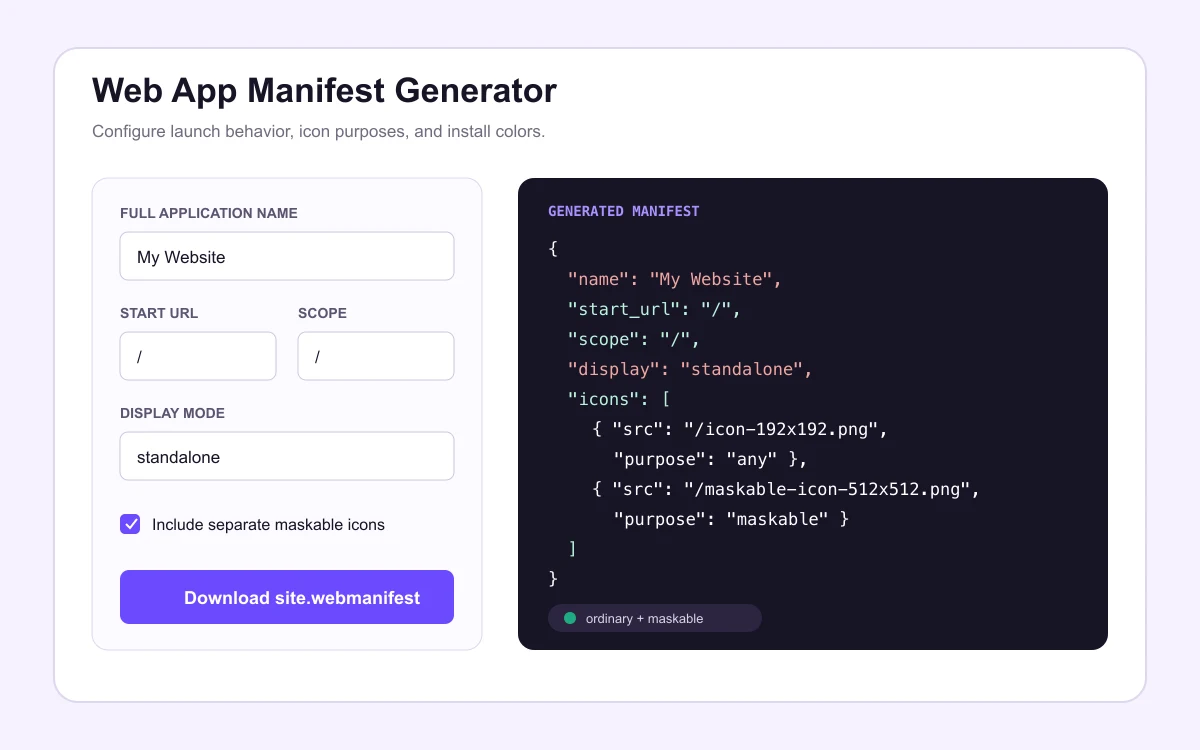
Generated web app manifest
Files this manifest expects
/icon-192x192.png/icon-512x512.png/maskable-icon-192x192.png/maskable-icon-512x512.png
Generate fields that match deployed files
A manifest is useful only when every icon URL resolves from the manifest’s own location. Keep ordinary and maskable artwork in separate files: ordinary icons can preserve transparent edges, while maskable icons need a full-bleed background and protected center.
Identity
Use a readable full name and a compact short name. These labels can appear in installation surfaces and should match the site users recognize.
Launch behavior
Keep start_url inside scope. Choose standalone only when the site has been designed and tested as an installed application.
Icon purposes
Declare 192 and 512 pixel ordinary icons with purpose: any. Add separately composed adaptive files with purpose: maskable.
Install and verify the downloaded manifest
Upload the JSON to a stable public path—commonly the site root—then add <link rel="manifest" href="/site.webmanifest"> to the shared document head so every indexable page declares the same file. Upload the four icon files the manifest expects at the paths shown beside the output, or edit the JSON if your deployment stores icons elsewhere.
After deployment, request the manifest URL directly and confirm an HTTP 200 response with the JSON you reviewed, then open each icon URL and verify status, format, and dimensions. A service worker or CDN can keep serving an older manifest after the repository is already correct, so re-test the public response rather than the source file when installation behaves unexpectedly.
Choose display and color values deliberately
Standalone display removes browser chrome and is right only for sites designed and tested as installed applications; minimal-ui and browser are safer defaults for content sites. The theme color tints surrounding interface on supporting platforms and the background color paints the launch surface before your CSS loads—both work best when they match the deployed page rather than an aspirational palette.
Web app manifest questions
What file name should the manifest use?+
site.webmanifest and manifest.json are both common; what matters is that the link element in your document head points at the deployed file and the server returns it publicly. Serve application/manifest+json when the host supports it, though browsers also accept application/json.
Where do the icon paths resolve from?+
Relative icon src values resolve against the manifest’s own public URL, not the page URL. A manifest served from /assets/site.webmanifest with "icons/icon-192.png" points at /assets/icons/icon-192.png—an easy mismatch to miss until installation fails.
Do I really need separate maskable icons?+
Yes, when you support adaptive install surfaces. A transparent ordinary icon gets cropped into circles and squircles with exposed corners; a maskable file needs full-bleed background and centered artwork. Relabeling the same file with purpose maskable does not change its pixels.
Does a manifest make my site installable by itself?+
No. Installability also depends on HTTPS, a service worker or equivalent criteria in some browsers, and each browser’s own heuristics. The manifest declares identity and assets; it cannot force an install prompt.
From favicon idea to verified deployment
Follow one clear path through creation, inspection, installation, and troubleshooting.